Your main dashboard includes an overview of your campaign(s) as well as some metrics about your performance.
Once you've logged into your dashboard, this is what you'll see:
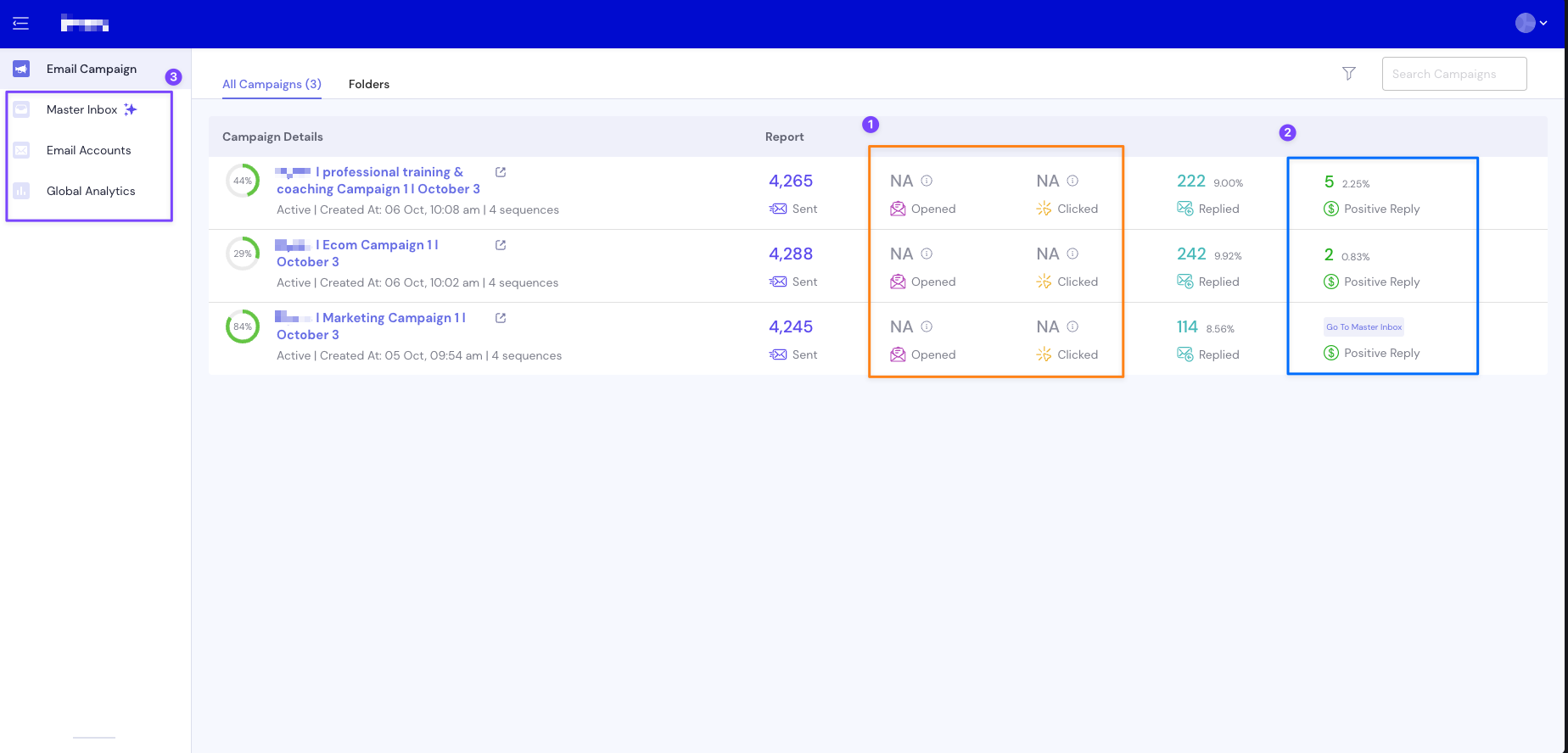
Here's a breakdown of the metrics:
Campaign Completion (The % in the green circle): This indicates how far along you are in your campaign. You will receive weekly updates from your Customer Success Manager(CSM). Once your campaign reaches 75%, your CSM will reach out with a suggestion for a new campaign.
Emails Sent: Indicates the amount of emails sent for a specific campaign to date.
Open and Click tracking: We do not track open or click rates and that's why they'll show as "N/A". Open or Click Tracking adds another pixel into your email which a lot of spam filters will auto-block or mark as spam. By not tracking them, we're more likely to avoid any issues with spam filters.
Replied: Your reply rate (%) is calculated as follows: Number of emails sent/total replies received.
Positive Reply: Anyone enrolled into a subsequence who showed any level of interest in the campaign.